Restore a backup
Backup restoration is a powerful but potentially destructive operation.
It allows you to restore your entire server, or a specific part of it, to a previously saved state in your backup.
Full backup restoration
To restore everything that has been saved in your backup and replace your whole server with the saved state, use the mb!restore command:
mb!restore <your-backup-code>
This command will overwrite all of your server's data with the data from the backup, by:
- deleting all existing data (channels, roles, emojis and stickers, etc.)
- restoring the data from the backup (creating channels, roles, emojis and stickers, etc. based on the backup data)
- applying bans from the backup
Upon executing the command, the bot will list what will be done, and ask you to confirm the operation by entering a confirmation code. It is generated randomly and is different for each restore operation to avoid accidental confirmations.
Make sure you thoroughly read the list of changes that will be made to your server, and understand the consequences of the operation before confirming it!
All restoration operations require a confirmation, which is done by sending the following message:
-confirm <confirmation-code>
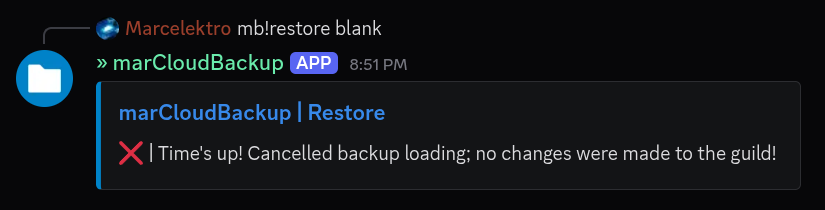
If you do NOT want to proceed and want to cancel the operation, do not entier the code, and let it timeout (after ~20s). The bot will state that the operation has been canceled.
Here's how it looks in action:
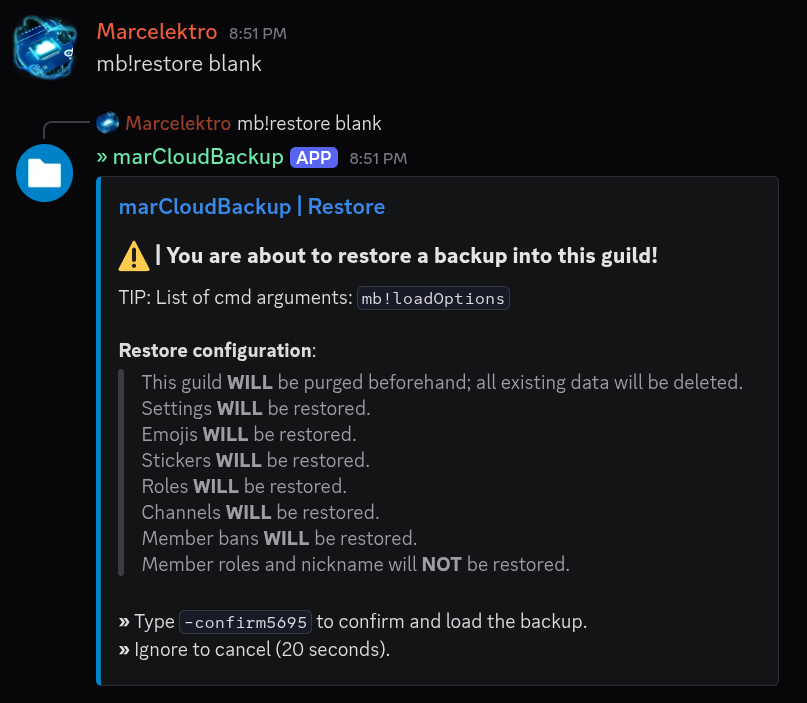
There you can see the list of changes that will be made to the server if the operation is confirmed.
You should always carefully read the change list before continuing.
After waiting, the bot cancels the operation:
Customized backup restoration
You can also customize the restoration operation with the following options:
-noClear— do not delete existing data, the backup will be appended to the existing server instead of replacing it-noSettings— do not restore server settings (name, icon, banner, configurations, etc.)-noChannels— do not restore channels-noRoles— do not restore roles-noEmojis— do not restore emojis-noStickers— do not restore stickers-noBans— do not apply bans from the backup-noMsgs— do not restore messages in channels (restores only the channel skeleton without messages)-msgLimit <number>— set the message restore limit per channel (see pricing for upper limits)-includeChannel <channel-name>— only include channels with the specified name (can be used multiple times to specify multiple channels)-excludeChannel <channel-name>— exclude channels with the specified name (can be used multiple times to specify multiple channels)-restoreMembers— restore member list with nicknames and assigned roles (Premium only)
The list of options can also be viewed via the mb!loadOptions command.
Restore customization will be improved soon for a better UX and less confusion for non-technical users.
This documentation will be updated accordingly once the improvements are implemented.
An example command with options looks like this:
mb!restore <your-backup-code>
    -noClear
    -noMsgs
    -restoreMembers
You may also write the command in a more readable way, e.g. by putting options in a new line:
mb!restore <your-backup-code>
-noClear
-noMsgs
-restoreMembers
Command above ⬆️ will restore the backup without deleting existing data, and without restoring messages, but will restore the member list with nicknames and assigned roles.
mb!restore <your-backup-code> -includeChannel general -includeChannel rules
Above command ⬆️ will clear the server and restore only the channels with the name "general" and "rules", while ignoring the rest of the channels in the backup.
Always read the change list that the bot shows before confirming the restore operation!
One typo could change the whole meaning of the command and lead to unintended consequences.
The bot will show you exactly what will be changed in your server before you confirm the operation, so make sure to read it carefully and understand the consequences of the operation before confirming it!
Append restore command
There is an alias command mb!restoreAppend which allows quick restore of a specific channel.
mb!restoreAppend <your-backup-code>
    -includeChannel <channel-name>
    -includeChannel <channel-name-2>
    ...
This is equivalent to running:
mb!restore <your-backup-code>
    -noClear
    -noSettings
    -noEmojis -noStickers
    -noRoles
    -noBans
    -includeChannel <channel-name>
    -includeChannel <channel-name-2>
    ...
Member restore command
There is also an alias mb!restoreMembers for only restoring member nickname and role assignments.
mb!restoreMembers <your-backup-code>
This will only restore the member role assignments (given they exist in the server) and nicknames.
This is equivalent to running:
mb!restore <your-backup-code>
    -noClear
    -noSettings
    -noEmojis
    -noStickers
    -noRoles
    -noChannels
    -noBans
    -restoreMembers